

SDWAN - "Secure Data Transfer"
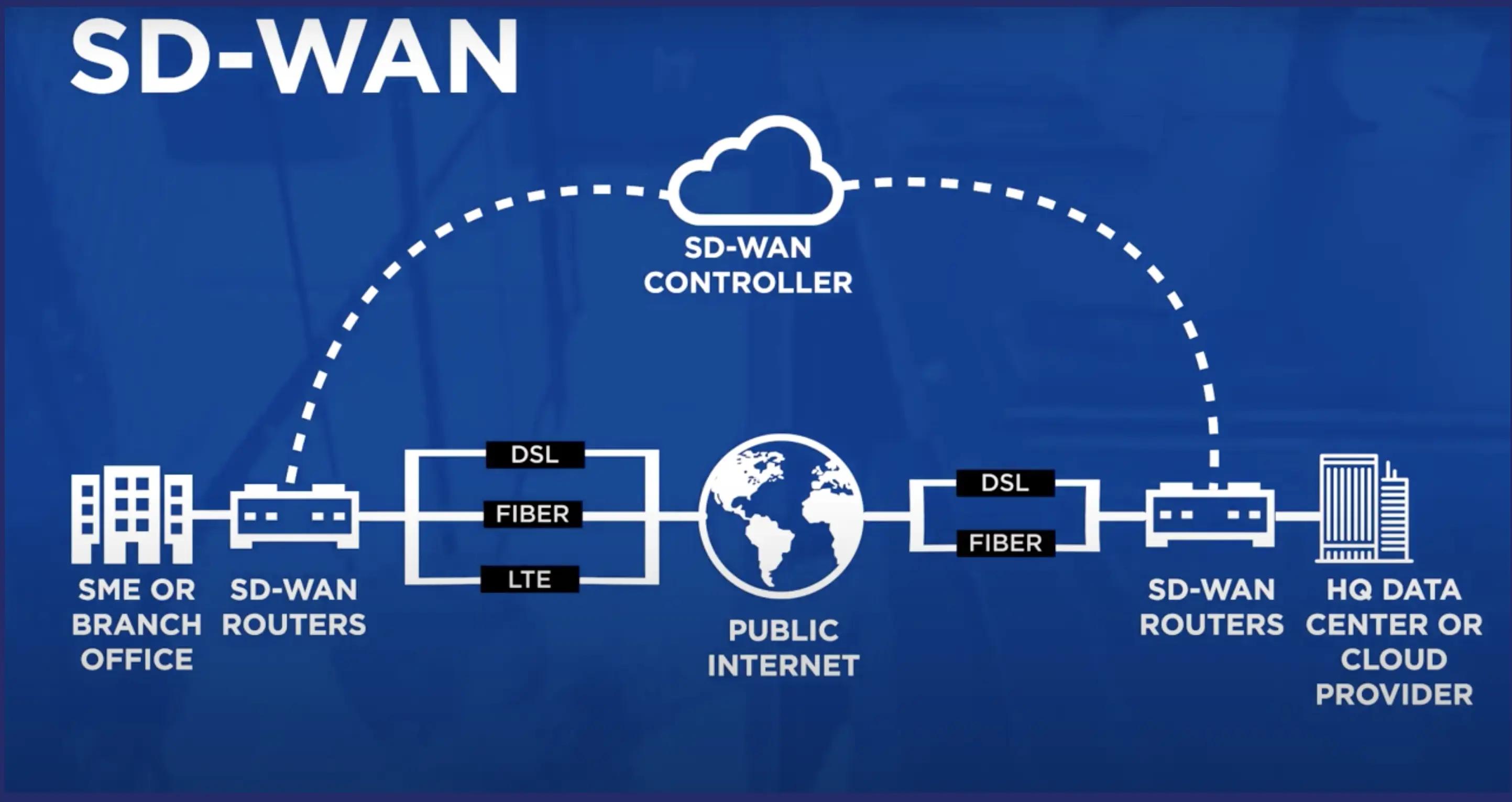
SD-WAN (Software-Defined Wide Area Network) is a networking technology that uses software to manage and optimize traffic across a wide area network (WAN). It replaces rigid, traditional networks by acting like a smart GPS, automatically routing data across the best available connection.
Introduction
SD-WAN does not directly transfer files. It acts as a smart, secure network layer that -
- Creates encrypted overlays (IPSec/GRE Tunnels) across WAN link.
- Dynamically routes traffic (File Transfers/API's/Pipelines)
- Choose the best path (Internet Vs InterConnect Vs MPLS)
Applies Policies (Priority, Cost, SLA)
Core Components
On Premise
- SD-WAN cEdge Device (CPE/Router)
- Local Network (File Servers, Apps)
SD-WAN Control Plane
- Controller (Policy Definition, Routing Rules)
- Orchestrator (Configuration Automation
GCP Cloud
- VPC Network (Landing Zone)
- SD-WAN Cloud Gateway/Virtual Router
- Cloud Router (BGP Routing)
- NCC (Network Connectivity Center)
Connectivity Options
- Cloud VPN (IPSec over Internet)
- Cloud Interconnect (Private Leased Connection - Gives low latency and high throughput {Private Path})
- Hybrid (Both for failover and cost optimisation)
Step By Step Flow
Step-1
File is generated on premise. For example 100GB batch file or streaming logs.
Step-2
Traffic hits SD-WAN cEdge.
Edge Device -
- Classifies traffic (E.g. Bulk data transfer)
- Applies Policies (Prefer Interconnect for large files and VPN as backup)
Note - SD-WAN is policy driven routing engine.
Step-3
SD-WAN creates secure overlay. Encrypted IPSec tunnels created between on-premise edge and cloud gateway.
Note - Enables secure site to cloud connectivity.
Step-4
Transport via underlay:
OPTION-1: Internet and VPN (Cheap | Secure via IPSec | Higher latency)
OPTION-2: Cloud Interconnect (Recommended)
- Private Connection
- High Throughput and
- Predictable performance
Note - SD-WAN can treat interconnect as just another transport path.
Step-5
Enter GCP via Cloud Gateway.
Note - Dynamic route exchange simplifies hybrid connectivity
Step-6
Deliver to target service (Files land in GCP GCS bucket)
[FOR MORE IN DEPTH DESIGN AND IMPLEMENTATION - KEEP WATCHING THIS SPACE]
Reference Links
Comments (0)
No comments yet.